


Gusto Mobile
4.62.01K Reviews
App Specs
- Version
- 3.78.1
- Updated On
- License
- Free
- Downloads
- 1,000,000+
- Developer
- Gusto, Inc.
- Categories
- Finance
- Platform
- Android, iOS
Screenshots
 Analysis by AppCompare
When I first looked at Gusto Mobile, I wanted to know a simple thing: would it help me handle a real payroll or HR task without turning my phone into another complicated business tool? I see it as a companion to Gusto’s small-business services, rather than a general-purpose personal finance app. That distinction matters. If you are an employee, it can be a place to check information tied to work; if you run a business, it can support the people and payroll side of your operation.
What to Expect from the App
Gusto Mobile is a free finance app from Gusto, Inc., and its focus is on small-business payroll, benefits, and HR. It has an average rating of about 4.5 from roughly 18,000 ratings, and more than a million installs. Those figures suggest that it has found a substantial audience, but they do not tell me whether it suits every workplace. The key question is whether your employer or business already uses Gusto and which tasks you need to handle on the go.
The app is not a replacement for a bank, a bookkeeping system, or a full desktop business platform. I would not install it expecting to compare household spending or manage personal investments. Its value is narrower and more practical: bringing work-related pay and HR tasks closer to the people who need them. The listed age rating is Everyone, and the current version is 3.67.0, with Android 8.0 as the minimum operating system requirement.
Who Gets the Most from It
I can see the clearest fit for employees who want a convenient way to reach payroll-related information, and for owners or administrators already working with Gusto who need a mobile route to routine tasks. It may be especially useful when a question comes up away from a desk: an employee wants to review a pay record, or a small-business owner needs to check the status of a people-related task before moving on with the day.
It is less compelling if your workplace does not use Gusto, or if you only need to manage payroll occasionally and prefer a desktop process. A mobile app cannot make a service useful when the underlying business relationship is not there. I would also choose a dedicated accounting tool if my main goal were reconciling transactions, preparing broad financial reports, or tracking business expenses; those are different jobs from employee-facing HR and payroll.
Getting Ready for a Useful First Session
Before opening the app, I would make sure I have the account details and work context needed to sign in. For an employee, that means using the access connected to the employer’s Gusto setup. For an owner or administrator, it means knowing which business account and responsibilities apply. This small bit of preparation can save the frustrating loop of trying different email addresses or assuming that an app install alone creates access.
Once inside, I would start with one clear goal rather than exploring every menu at once. If I am an employee, I would look for the specific pay or benefits information I came to check. If I manage a small team, I would focus on the task that is due next. That approach makes a first session feel useful even if the app has more options than I need that day.
Worth Reading Before You Choose

EA SPORTS FC Mobile 26 Is a Bigger Football Game, but It Takes Time

Flipboard Shows What News Apps Must Do Beyond the Feed

Switching to Android Auto Means Rethinking Your Driving Routine

Google Calendar Makes a Crowded Week Easier to Manage

Ludo King Makes the Most of the Minutes Between Plans

Baby Panda World Brings Quick Play to Modern Phones, but Its Game Library Feels Busy
A First Successful Action
A realistic first win is resolving a straightforward payroll question without sending a message to the person who normally handles it. For example, an employee who wants to check a pay-related record can open the relevant information, review it, and then contact the employer only if something still looks unclear. That is a modest benefit, but it can reduce needless back-and-forth and give the employee a more direct starting point.
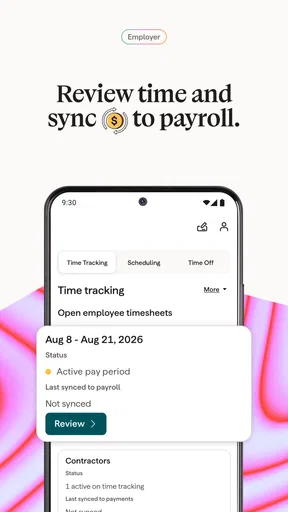
For a business owner, the first useful action may be checking a pending people task before a busy day begins. I would use the phone to orient myself and identify what needs attention, then handle anything that calls for careful review in the setting best suited to it. The phone is convenient for quick checks; payroll deserves a deliberate final review rather than a rushed tap while distracted.
How It Fits into a Small-Business Workflow
The practical trade-off is that a mobile view is good for access and quick follow-through, while a desktop workflow may be easier when a task involves lots of details or several people. I would treat the app as a useful extension of a Gusto-based process, not as a reason to move every HR decision onto a phone. Keeping that boundary clear helps prevent convenience from becoming haste.
Compared with handling everything through email, shared spreadsheets, or paper records, a connected payroll and HR app can give employees and administrators a more organized place to start. Compared with a broad accounting app, Gusto’s role is more people-centered. The better choice depends on the work: use accounting software for the company’s wider financial picture, and use Gusto Mobile when the task is tied to the Gusto payroll or HR relationship.
Small Habits That Make Mobile Use Smoother
One useful habit is to separate a quick information check from a decision that affects payroll or benefits. I would use the app to find the relevant detail, then pause to verify names, dates, and the intended action before submitting anything consequential. That is not a special trick; it is a sensible safeguard whenever a small screen makes it easier to move quickly than to review carefully.
Another is to keep a short note of recurring questions employees ask. If the same pay or benefits question comes up repeatedly, pointing people toward the appropriate information in their Gusto account may reduce interruptions. It will not remove the need for clear communication from an employer, but it can give employees a consistent place to check before they ask for help.
Common Confusion and Realistic Limits
The main source of confusion for a first-time user is the difference between downloading the app and being set up to use it. Gusto Mobile is tied to a workplace’s use of Gusto, so an employee should not expect to create a complete payroll profile independently. If sign-in does not work, I would first confirm that I am using the account associated with the employer, rather than repeatedly resetting credentials or assuming the app is broken.
There is also a difference between access and authority. Being able to view information does not necessarily mean that every user can change it or approve a business action. Owners and employees have different responsibilities, and an app’s usefulness will depend on the role connected to the account. For anything affecting pay or benefits, I would confirm the relevant details with the appropriate person instead of treating a mobile screen as a substitute for workplace approval.
Mobile convenience has limits, too. Small screens are not ideal for comparing a lot of records or reviewing complicated details, and a phone is easy to use while distracted. If I need to examine an unfamiliar payroll issue closely, I would choose a quiet moment and a larger screen where possible. That is a practical boundary, not a reason to dismiss the app: quick access and careful administration are different needs.
Choosing It Over Other Approaches
If your current process is a collection of messages and spreadsheets, Gusto Mobile may make employee access feel more direct, provided your business already uses Gusto. If your process is built around another payroll provider, changing tools just to get a mobile app is unlikely to be worthwhile on its own. The underlying service and fit for the business matter more than the convenience of one interface.
Likewise, a solo operator with very occasional payroll needs may prefer a simpler arrangement rather than adopting a broader HR workflow. A growing business with employees, benefits, and recurring payroll responsibilities has more reason to value a connected system. I would judge the app by whether it helps the people in your business answer routine work questions and complete relevant tasks, not by how many menus it offers.
My Take on the Experience
In the published app description, Gusto’s role is to simplify payroll, benefits, and HR for small businesses. In practical terms, I think the strongest reason to use its mobile app is to make those work-related details easier to reach when a computer is not nearby. It is not a magic fix for unclear policies or payroll mistakes, and it cannot replace a good process between an employer and employees.
The app is free to download, but that should not be confused with a promise that every Gusto business service is free. I would check how Gusto fits the employer’s existing arrangement before making a decision based on the download price alone. That is particularly important for owners choosing a payroll system: compare the complete service and workflow, not just the phone app.
Before You Make It Part of Your Routine
For a first-time user, I would keep the first visit simple: sign in with the work account, identify the one pay or HR question that matters today, and confirm that the information is relevant to your role. If you are an employee, start with access to your own work-related details. If you are responsible for payroll or HR, use the app for convenient checks while reserving time and attention for actions that need close review.
Gusto Mobile is best for people whose workplace already relies on Gusto and who want a more convenient way to stay connected to its payroll and HR process. It is not the right fit for someone seeking a general money-management app, or for a business that needs a different core payroll or accounting system. For the right user, though, that narrower focus can be a strength: it gives everyday work questions a clearer place to begin without pretending to replace the rest of a business’s financial toolkit.
If you're anything like me, managing finances can sometimes feel like trying to solve a Rubik's cube blindfolded. Enter Gusto Mobile, the app that's here to make payroll, taxes, and HR a breeze. I took it for a spin to see if it lives up to the hype, and spoiler alert—it might just be the solution we've all been waiting for.
First Impressions
When I first opened Gusto Mobile, I was greeted by a sleek, intuitive interface that made navigation feel like a walk in the park. The color scheme was easy on the eyes, and the layout was uncluttered, which is a huge win in my book. I hate when apps try to cram too much info on one screen, but Gusto kept it simple yet effective.
Setting Up
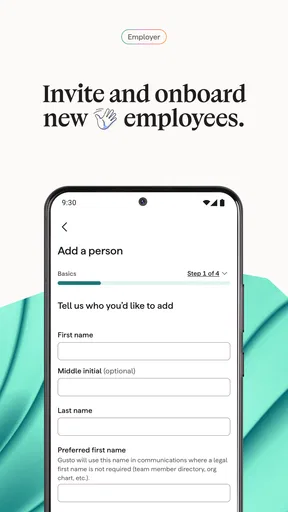
Getting started with Gusto was surprisingly straightforward. The app guided me through the setup process with clear instructions, making sure I didn’t miss a step. I appreciated the little tips and reminders sprinkled throughout, which felt like having a friendly guide by my side. It only took about 20 minutes to get everything up and running, which is faster than my morning coffee routine!
Features That Stand Out
Now, let's dive into what makes Gusto a standout choice for businesses:
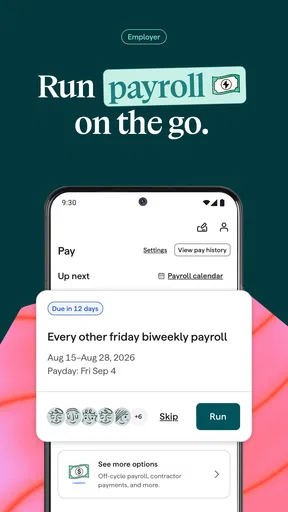
- Automated Payroll: With the tap of a button, payroll is processed, taxes are filed, and employees are paid without breaking a sweat.
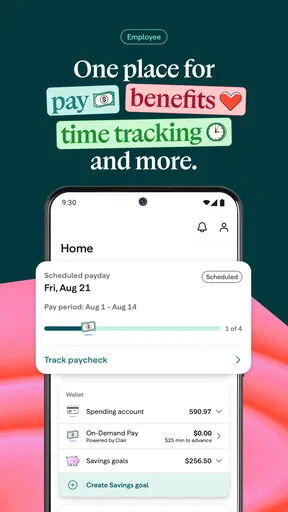
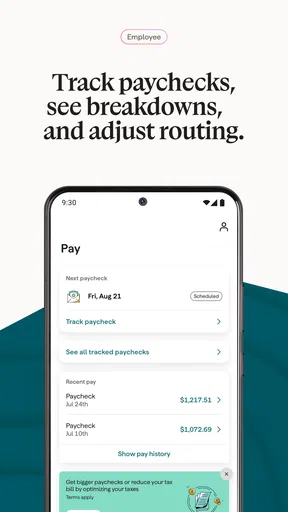
- Employee Self-Service: Employees can access their paystubs, tax documents, and benefits info directly from the app, reducing the workload on HR.
- Compliance Alerts: This feature keeps you up-to-date with the latest regulations, so you’re always in the loop.
- Integrated Benefits: From health insurance to 401(k) plans, Gusto’s got you covered, making it a one-stop-shop for all things HR.
User Experience
Let’s talk about user experience for a moment. I found Gusto to be incredibly user-friendly. The menus are logically organized, and the app flows seamlessly from one task to the next. What I loved most was how responsive it was—no lag, no glitches, just smooth sailing all the way.
Security and Support
In today’s digital age, security is paramount. Gusto employs robust security measures, including encryption and two-factor authentication, to keep your data safe. Plus, if you ever run into an issue, their customer support is just a chat away. I tested this out by asking a couple of questions, and received prompt, helpful responses. It’s nice to know they’ve got your back.
Room for Improvement
No app is perfect, and Gusto is no exception. While the app is packed with features, some smaller businesses might find it a bit overwhelming at first. A few more tutorials or an in-app help center could make the initial learning curve a bit easier to navigate for newcomers.
Final Thoughts
Overall, Gusto Mobile is a powerful tool for any business owner looking to streamline their HR processes. It’s efficient, user-friendly, and packed with features that take the hassle out of payroll and benefits management. Whether you’re a small business or a growing enterprise, Gusto has something to offer.
So, if you’re tired of juggling spreadsheets and dealing with the never-ending tedium of payroll, give Gusto a try. It might just be the game-changer you need to elevate your business to the next level.
Pros
- User-friendly interface for easy navigation.
- Quick setup with minimal initial configuration.
- Comprehensive payroll features included.
- Integration with popular accounting software.
- Responsive customer support available.
Cons
- Limited features in the free version.
- Occasional glitches on older devices.
- No offline mode available.
- Requires frequent updates for optimal use.
- May have a learning curve for new users.
FAQs for Gusto Mobile
What is Gusto Mobile used for?
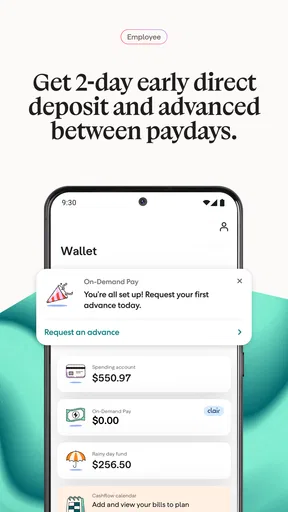
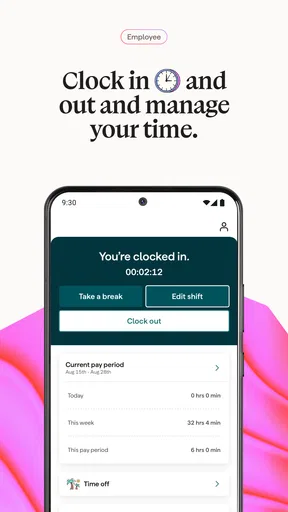
Gusto Mobile is a comprehensive app designed to simplify payroll, benefits, and HR management for small businesses. It allows business owners to manage employee payments, track benefits, and handle HR tasks all in one place. The app streamlines various administrative processes, saving time and reducing the risk of errors.
Is Gusto Mobile secure for handling sensitive employee information?
Yes, Gusto Mobile employs robust security measures to protect sensitive employee data. The app uses encryption and secure protocols to ensure that all information is stored and transmitted safely. Additionally, Gusto Mobile adheres to industry-standard privacy practices to ensure data compliance and protection.
Can Gusto Mobile integrate with other business tools?
Gusto Mobile offers integration with several popular business tools and software, such as QuickBooks, Xero, and time-tracking apps. This integration capability allows for seamless data transfer and synchronization between platforms, enhancing workflow efficiency and reducing manual data entry tasks.
Is Gusto Mobile available for both Android and iOS devices?
Yes, Gusto Mobile is available for download on both Android and iOS platforms. The app provides a user-friendly interface that is optimized for mobile devices, ensuring that business owners can access and manage their payroll and HR tasks on the go, regardless of their device preference.
Does Gusto Mobile offer customer support for users?
Gusto Mobile provides comprehensive customer support to assist users with any issues or questions. Support is available through multiple channels, including email, phone, and live chat. Additionally, the app offers a range of online resources, such as FAQs, guides, and tutorials, to help users navigate its features effectively.


